Smartphone OS Innovations Behind Seamless Multitasking
Smartphone users jump between messaging, email, video, and social apps in seconds and expect everything to feel instant. Seamless multitasking does not happen by accident. It comes from big changes in mobile operating systems that manage memory, power, and processing far more intelligently than before. Modern mobile platforms now juggle dozens of tasks at once, while still keeping the interface smooth and responsive. Developers also build apps that align with these system rules, so nothing slows the phone down. This mix of OS innovation and app design makes modern multitasking feel natural, fast, and surprisingly stable.
The Core Smartphone OS Innovations That Enable Seamless Multitasking
Intelligent Memory Management for Faster App Switching
Modern smartphone operating systems treat RAM as a dynamic space that constantly adapts to user behavior. The system predicts which apps you are most likely to reopen and keeps their key processes in memory, while freezing or unloading less relevant apps. Built-in memory control tools and strict process lifecycle rules decide what stays active. Compression techniques shrink background data so more apps fit into limited RAM. When you tap an icon or swipe from the recent apps view, the OS can instantly restore the last state instead of relaunching from scratch. This intelligent memory management cuts wait times and makes app switching feel almost instant.
Split-Screen, Floating Windows, and Multi-Window Features
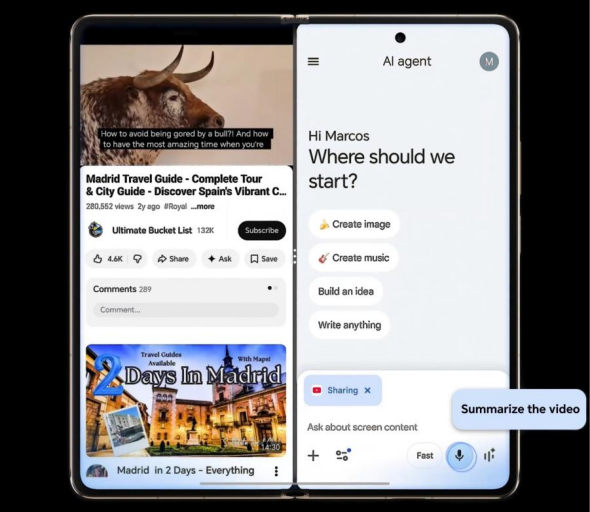
Split-screen and multi-window modes turn the HONOR Magic V6 fold phone into a compact productivity hub. Many mobile systems let users pin two apps side by side, ideal for taking notes while browsing or comparing documents. Some interfaces add floating windows, where apps appear as resizable overlays that can be dragged around. Foldables and tablets extend these ideas further, supporting three or more apps on screen at once. Other mobile platforms approach multitasking differently on larger screens, focusing on touch gestures and simple controls. These interfaces rely on OS-level window managers that prioritize active content, handle layout, and prevent background apps from draining performance.

AI-Powered Resource Allocation and Performance Optimization
Smartphone OS developers now weave machine learning into the core of performance management. The system observes which apps you use most, when you use them, and how long sessions last. AI models then adjust CPU, GPU, and RAM allocation to favor those high-priority tasks. For example, the OS can boost performance briefly when it predicts you will open the camera or a game, then scale back to save battery once you finish. Background apps that are rarely opened may get fewer resources. This adaptive approach keeps the interface responsive without wasting power, while still letting demanding apps run smoothly when you need them.
How Modern Smartphone Operating Systems Improve Productivity?
Cross-Device Connectivity and Workflow Continuity
Modern OS ecosystems focus heavily on continuity across phones, tablets, and laptops. Cross-device features let users start an email on one device and finish it on another, or copy text on one device and paste it on another. Some mobile systems also sync notifications, messages, and clipboard data with desktop devices. Cloud-based sync keeps documents, browser tabs, and app states aligned across devices. These features rely on secure background services, identity management, and low-latency communication protocols. The result is a fluid workflow where the smartphone acts as both a standalone tool and a central hub for cross-device productivity.
Background Process Optimization for Smooth Performance
Smartphone operating systems now treat background activity with far more discipline. Instead of letting every app run freely, the OS groups tasks into scheduled batches. Built-in task schedulers and idle modes limit network calls and wakeups when the phone is not in active use. Other systems apply strict background execution limits and prioritize system services like backup and notifications. Push messages often pass through optimized OS channels instead of custom app polling. This approach reduces random CPU spikes, network use, and battery drain. Users still receive important alerts and updates, but the interface stays smooth, and foreground apps rarely slow down due to hidden background tasks.
Adaptive User Interfaces for Different Screen Sizes
Screen sizes vary from compact phones to large tablets and foldables that shift between phone and tablet modes. To keep multitasking fluid, smartphone OS designers promote adaptive layouts. Mobile systems encourage responsive UI components and constraint-based design so apps resize gracefully in split-screen or freeform windows. Foldable-specific development tools help apps react to hinge states and display cutouts. Layout frameworks, size classes, and multitasking templates help manage different orientations and split-view setups. These tools let apps rearrange content, adjust touch targets, and keep text legible. Users benefit from consistent, usable multitasking interfaces, no matter how the screen shape changes.
Conclusion
Seamless multitasking on smartphones comes from many layers working together: intelligent memory management, flexible multi-window interfaces, AI-driven performance tuning, and disciplined background control. Cross-device continuity and adaptive layouts further extend productivity beyond a single screen. As hardware improves and network speeds rise, operating system innovation will remain the key factor that determines how fluid mobile workflows feel. Developers who respect these OS guidelines can build apps that open faster, switch more smoothly, and cooperate better with other tools. Users then gain a phone that truly supports busy days, creative projects, and constant context switching without frustrating slowdowns.
}})
George Washington
Lorem ipsum dolor sit amet, consectetur adipisicing elit. Ducimus itaque, autem necessitatibus voluptate quod mollitia delectus aut, sunt placeat nam vero culpa sapiente consectetur similique, inventore eos fugit cupiditate numquam!